Microsoft MDEP explained: what really changes for Teams Rooms?
Not long ago, choosing a Microsoft Teams Room was relatively straightforward. You selected the right hardware, equipped the room and were set for years to come.
That is changing.
Microsoft continues to develop Teams Rooms at a rapid pace. New features are being introduced increasingly quickly, while organisations expect meeting rooms to be just as reliable and manageable as the rest of their IT environment. As part of this development, one new term is appearing more frequently: MDEP, the Microsoft Device Ecosystem Platform.
You may already have come across the name in Microsoft documentation or from Teams Rooms hardware manufacturers. But what exactly is Microsoft MDEP and what does MDEP mean for Teams Rooms? Is it mainly a technical change happening behind the scenes, or does it affect the decisions you make about your meeting rooms today?
Patrique Petit, Microsoft 365 Specialist at AVEX, is seeing more and more organisations asking these questions. In this article, we explain what MDEP is, why Microsoft is taking this step and what it means for the future of Microsoft Teams Rooms.
Why is Microsoft changing the foundation of Teams Rooms?
Over the past few years, Microsoft Teams Rooms and other professional meeting solutions have become an important part of hybrid working. At the same time, the range of devices has grown. Touch panels, video bars, room systems and accessories from different manufacturers are now all part of the same meeting environment.
This provides plenty of choice, but it also creates challenges. Different devices use different software versions, updates are not always rolled out in the same way and management can vary between manufacturers. Users hardly notice this. IT departments certainly do.
Microsoft therefore wants greater control over the foundation on which Teams Rooms run. Not to limit choice, but to better align management, security and innovation. MDEP was developed as part of this approach.
What is Microsoft MDEP?
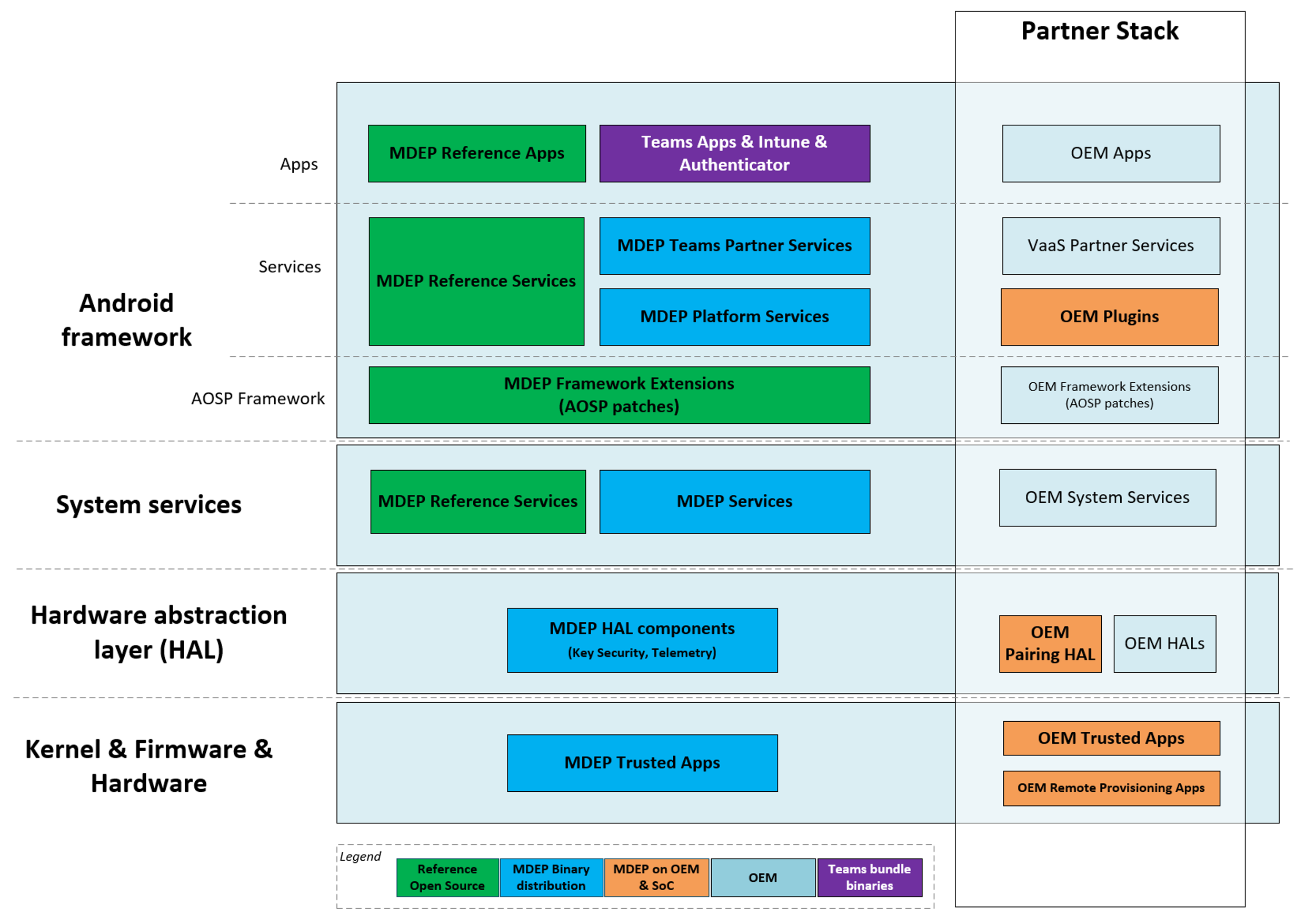
MDEP stands for Microsoft Device Ecosystem Platform. It is an AOSP (Android Open Source Project)-based platform developed by Microsoft for specialised devices that form part of the Microsoft ecosystem, including Teams Rooms. You can think of it as a new foundation for Teams Rooms solutions from different manufacturers. More technical information about the platform is available in the official Microsoft MDEP documentation.
For users, very little changes at first glance. A Teams Room remains a Teams Room. But behind the scenes, Microsoft is increasingly taking control of the underlying platform.
This creates an environment in which Microsoft has greater influence over:
- Security
- Updates
- Management
- Integration with Microsoft services
- Future innovation
The aim is to make devices more consistent, secure and easier to manage.
Why is MDEP important for IT management?
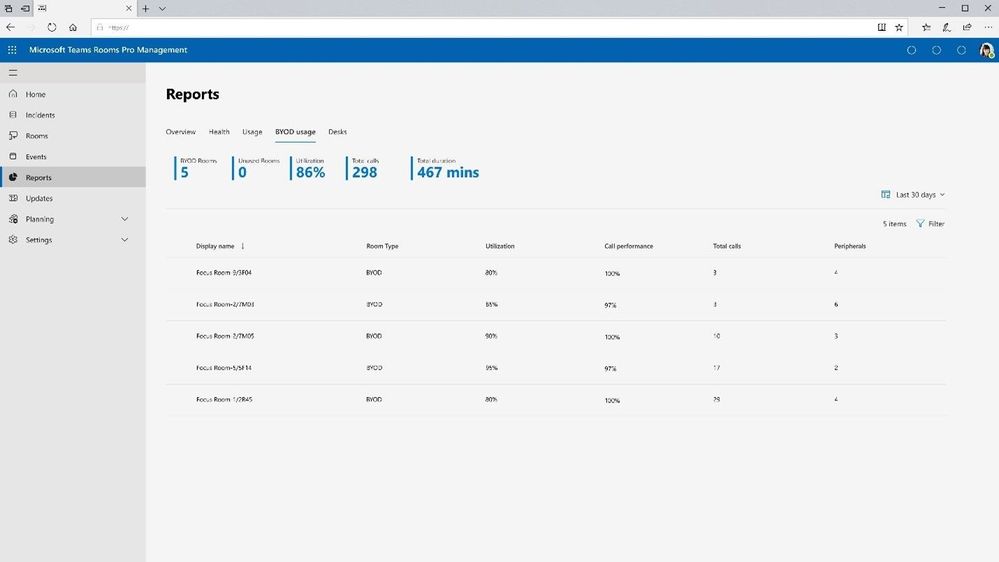
The biggest impact of MDEP is not new buttons or a different interface, but management. Many organisations are working towards greater standardisation. Not because it sounds exciting, but because it makes day-to-day management easier. The fewer exceptions there are, the less time IT teams need to spend on support and troubleshooting.
MDEP supports this development. The platform enables Teams Rooms to integrate more closely with the wider Microsoft ecosystem. This means:
- Greater consistency between rooms
- More consistent updates
- Greater control over security
- Less reliance on different management processes for each manufacturer
For organisations with multiple locations or dozens of meeting rooms, this can make a significant difference. It is also becoming increasingly important when designing a standardised meeting room environment. With BRIX, for example, AVEX equips different types of meeting rooms according to a consistent standard.
What does MDEP mean for existing Teams Rooms?
This is often the first question we are asked. The short answer: probably nothing immediately. MDEP does not mean that your existing Teams Rooms need to be replaced tomorrow.
However, it makes sense to take this development into account when making future decisions. Many organisations are currently facing a lifecycle challenge. The first generation of Teams Rooms is gradually reaching the end of its supported lifecycle. If you are already considering an upgrade, this is a logical moment to look beyond the hardware alone.
In our article From first-gen to future-proof: how to approach the Teams Rooms lifecycle, we explore this lifecycle challenge in more detail and explain how to determine when it is time to renew your environment.
That is when an important question becomes relevant: are you choosing a Teams Rooms solution that aligns with the direction Microsoft is taking?
Why MDEP is more than a platform change
What makes MDEP particularly interesting is what it tells us about the direction Microsoft is taking. The focus is increasingly on:
- Centralised control
- Consistent management
- Stronger security
- Faster innovation
That last point is important. New functionality is increasingly being developed within the Microsoft platform itself. The better devices integrate with that platform, the easier it becomes to introduce new capabilities.
MDEP is therefore more than a technical change. It is also a signal of how Microsoft Teams Rooms are likely to develop over the coming years.
MDEP, AI and the future of Microsoft Teams Rooms
In the first article in this series, we discussed the three biggest developments in Microsoft Teams Rooms that are currently coming together:
- Lifecycle management
- MDEP
- AI in the meeting room
These developments are closely connected. Lifecycle determines when you need to invest again, MDEP determines what the technical foundation looks like, and AI builds on that foundation.
That is precisely why MDEP is so relevant. Many future innovations require a secure, consistent and manageable environment. With MDEP, Microsoft is laying the foundation for this.
Other developments within the Microsoft ecosystem are also becoming increasingly connected to the physical meeting environment. Microsoft Places, for example, connects information about employees, workplaces and meeting rooms with the physical workplace.
What can your organisation do about MDEP now?
You do not need to understand every technical detail of MDEP right away. However, this is a good time to take a critical look at your current Teams Rooms environment.
Ask yourself questions such as:
- Which Teams Rooms are we using today?
- Which rooms will need to be replaced over the next few years?
- How do we currently manage our Teams Rooms environment?
- What role does Microsoft play in our workplace strategy?
- How important are future developments such as AI to our organisation?
The answers to these questions can already provide a great deal of direction.
MDEP is primarily an investment in the future of Teams Rooms
Microsoft MDEP will not suddenly solve every challenge surrounding Teams Rooms, but it is an important building block for the next generation of meeting rooms. Greater control over management. More consistency. Better alignment with future developments.
This means MDEP is not a topic that is only relevant to technical specialists. It matters to any organisation thinking about the future of its Teams Rooms and meeting environments.
Are you planning to renew your existing Teams Rooms or would you like to understand which choices align with the direction Microsoft is taking? We would be happy to review your current environment with you and explore the next step.

Patrique Petit
Microsoft Office 365 Specialist

Publication date
18 October 2026
Updated date
19 October 2026
Sector
All Sectors
Solution
Auditoriums, Boardrooms, Meeting Rooms
Keep exploring